Posts

Creative Critical Reflection

Image
  How does your product use or challenge conventions AND how does it represent social groups or issues?   My product uses different conventions in every clip. It contains close ups, wide shots, over the shoulder shots, and more. While there is music that plays throughout the commercial in a sound bridge, there is no  Dialogue  or voice over. Apple products represent social groups or issues by making everything easier to communicate. How does your product engage with audiences AND how would it be distributed as a real media text?   My product engages with audiences by starting off with a popular upbeat song.  By using a well known and widely loved song, viewers are automatically hooked and want to continue watching.  It would be distributed as a real media text online.  This commercial would be an add played videos.   How did your production skills develop throughout this project? My production skills developed heavily throughout this pro...

commercial

This commercial was a really enjoyable experience and so much fun to do. I was able to work with new friends doing something that I find interesting. Every bit of it was entertaining, from brainstorming ideas to editing. When going out to film my group and I felt great being able to do everything on our own. The  whole process was very independent. Being that all of us had good work ethic, there was no stress about the commercial. Throughout filming everybody knew when able to play around versus when to get serious. There was a lot of creativity and so many ideas sprouted, it was hard to fit it all into just 30 seconds. Choosing the commercial music and editing it was also a lot of fun. Overall, this was a very nice experience and I am glad to have done it.  

Editing Blog

Image
 Today the proper editing process began. First, Faith and I sorted through the new clips and choosing the best ones. I air dropped all of the clips to my desktop where I could use them. I opened the iMovie software on my apple lap top and was easily able to figure it out. I dragged each clip to the iMovie location. I made sure I sorted them all into the correct order. By having them already ordered correctly it was able to view the commercial in the way it was intended. There were 11 clips actually used. After adding every clip I realized the commercial was too long. It was rather easy to cut the clips. Cutting each clip allowed for swifter transitions and shortened the video. I ended by creating a closing screen with the word Apple and their logo. To do that I went through pics art on my phone and used a black template to write the word Apple on. I then looked up the apple logo online and saved a png of it. Faith and I decided on a font then centered everything on the screen. Ther...

Editing Blog: From Home

Image
 Today I again went over all of our clips. There were dozens of clips that needed to be sorted through. Being that the commercial could only be 30 seconds long, there was clearly too much film. I was not present in class today so I did all that I could on my own. While I was out of town i kept in touch with Faith and Janiya through out the class. They informed me that the clips we had previously shot were not adequate. After looking through the clips the group and I choose which ones to re-shoot. Janiya and went back out onto the field to film the new shots. I went through every existing clip and deleted all the unnecessary ones. There were plenty of accidental shots and failed takes. After sifting through every clip there were plenty left to work with. There were more clips of Janiya running to work with after today. I sent all of our existing, useable, clips to our group chat. After looking through numerous editing apps, I felt the best one to use would be iMovie. Being that I wa...

Filming Blog

Image
 Today we had to continue filming, but couldn't. One of our group members, Faith, was sick, and we needed her to continue filming. On the first day of filming we shot all the scenes that included Janiya, and not faith. However, the last scene we had Faith. This scene had Janiya in it as well so we couldn't just switch actresses. So, we did not film any other scenes today, but were productive in another sense. We began by viewing every clip that we had, eliminating ones that would not work. We then edited every clip to the length that we needed. We couldn't edit any further because we were lacking half of our clips. After doing all that we could with the clips we had, we stopped. We began just discussing what we were going to do for our next production day. We knew that we were missing necessary clips so we hope Faith feels better.  Janiya and I discussed our plan if Faith were to still be sick that day.  We will re-film the final clip with a different actor in place of Fa...

Filming Blog: Media Center

Image
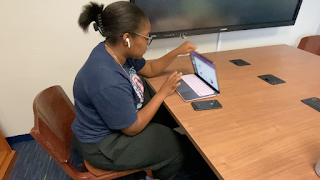
Today, September 29th, my group began filming our commercial. We forgot one of our props and were therefore only able to shoot half the commercial. The other actress also could not film their scenes, even the ones that didn't require the specific prop. This is because if they filmed some scenes one day and the rest another day, the costumes would be different. We also could not film our opening scene as it requires both actresses'. I filmed everything and made sure to try and hold the camera as steady as I possibly could. Faith couldn't be in the shots today so she was a big help behind scenes. We were able to get a lot done because the media center was empty and we had no distractions. The first scene I directed was Janiya walking through the front doors into the media center. There was then a series of about 4 clips from her walking through the door to sitting at the desk. Each clip will have a jump cut transition between them. While the commercial is meant to alternate b...

Storyboard

Image
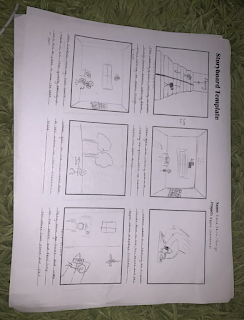
   ~In the first box we have two people walking on the stairs in different directions.  One of the people is getting ready to go and study and the other is going in the opposite direction to go for a jog both displaying their apple products also both with airpods in. ~In the second box it pans over to the first person in the library using their mac book to study for an exam in this shot it shows how the apple products can be used in an everyday resourceful way ~In the third box it goes over to person number two tying their shoes getting ready to go on there job it zooms out from their apple watch where it is showing the physical activity app that tracks heart rates and how active a person is. They are also talking on their airpods while doing all of this. ~In the fourth box it goes back to the first person it shows the person finishing their work/studying, now showing them packing up. They then swivel in their chair which displays their iphone specifically showing the app...